


Introduction
This AI-powered website accessibility app improves usability for people with visual, auditory, motor, and cognitive disabilities. It offers 100+ accessibility features, 190+ languages, and 12 accessibility profiles.
All in One Accessibility® Pro – Joomla extension
This extension helps Joomla websites improve accessibility for 51+ global standards, including WCAG 2.0, 2.1, 2.2, ATAG, ADA, EAA, Section 508, France RGAA, California Unruh, European EAA EN 301 549, UK Equality Act, Spain UNE 139803:2012, Australian DDA, Israeli Standard 5568, UAE Disability Act (Federal Law No. 29 of 2006), Saudi Web Accessibility Standards, Qatar National e-Accessibility Policy, Ontario AODA, Canada ACA, German BITV, Brazilian Inclusion Law (LBI 13.146/2015), JIS X 8341 (Japan), Italian Stanca Act, Indian RPwD Act, Switzerland DDA, and other accessibility standards.
The website accessibility app creates a strong foundation for digital compliance on Joomla websites.
Highlights
- Quick setup: Installs in about two minutes with a lightweight script.
- Lightweight: Loads asynchronously, typically adding under 100 ms, so page content is never blocked.
- AI-assisted: Automatic image alt-text remediation, with manual editing from the dashboard.
- Multilingual: 190+ languages, with automatic browser-language detection.
- Centralized dashboard: Manage app appearance, settings, users, and multiple websites in one place.
- Free support: Our support team helps with installation and any queries.
- Free trial: 10-day free trial with access to all accessibility features. Start your free trial.
Who Uses This AI Accessibility App?
- Website owners and merchants serving a diverse audience
- Businesses preparing for global accessibility compliance
- Brands seeking improved UX, higher conversions, and better SEO
- Corporations, enterprises, and multisite environments
- Government bodies, healthcare, education, and financial institutions
- Organizations looking for a cost-effective accessibility solution
Who Does It Help?
People who are blind or have low vision, are deaf or hard of hearing, have motor impairments, color blindness, dyslexia, cognitive or learning disabilities, seizure disorders or epilepsy, Parkinson's disease, ADHD, as well as elderly users.
Why Choose This Accessibility App?
- Installs smoothly, works with cloud-hosted setups, and fits naturally into multi-site and multi-domain configurations.
- Activates instantly, works with custom themes, and doesn't interfere with core site functionality such as checkout, navigation, or page builders.
- Automatic AI-powered enhancements help identify and fix common accessibility gaps across dynamic and CMS-driven pages.
- Loads asynchronously, keeping site speed intact even on large or high-traffic websites.
- Works with Progressive Web Apps (PWA) built on React, Vue, or Angular.
- Improves usability, strengthens accessibility compliance (ADA, EAA, WCAG), and supports a more inclusive user experience.
- Accessible websites see improvements in navigation clarity, content discovery, and conversion flows – leading to better engagement and SEO.
- Compared with manual remediation or full template rewrites, it offers a more affordable path to continuous accessibility improvements.
- On-premises deployment is available for enterprises, government, healthcare, and financial organizations.
- Free support from our team for installation and queries.
Security and Privacy
- Does not collect or store any personally identifiable information (PII) or behavioral data from websites or visitors. See the privacy policy.
- Certified ISO 27001:2022 and ISO 9001:2015.
- Aligned with GDPR, CCPA, COPPA, HIPAA, and SOC 2 Type II.
- Skynet Technologies USA LLC is an organizational member of IAAP and W3C.
- AI models are not trained on user voice or biometric data; they use predefined datasets, industry best practices, and accessibility guidelines.
- Under EU AI Act risk categories, the solution falls in the minimal/no risk category, as it acts as an assistive tool and makes no decisions affecting individuals' rights.
- Site owners are responsible for reviewing their own compliance requirements.
- Trust Center
Limitations
- The extension improves accessibility and usability but is not a full replacement for manual WCAG remediation.
- Some advanced features require a commercial subscription and Paid Add-ons.
- Automated fixes may not address all accessibility issues.
- Each domain and subdomain requires its own license (wildcard subdomains are not supported), or a multisite plan.
For more details, visit the Joomla accessibility app page.
Supported Languages (190+)
English (USA), English (UK), English (Australian), English (Canadian), English (South Africa), Español, Español (Mexicano), Deutsch, عربى, Português, Português (Brazil), 日本語, Français, Italiano, Polski, Pусский, 中文, 中文 (Traditional), עִברִית, Magyar, Slovenčina, Suomenkieli, Türkçe, Ελληνικά, Latinus, Български, Català, Čeština, Dansk, Nederlands, हिंदी, Bahasa Indonesia, 한국인, Lietuvių, Bahasa Melayu, Norsk, Română, Slovenščina, Svenska, แบบไทย, Українська, Việt Nam, বাঙালি, සිංහල, አማርኛ, Hmoob, မြန်မာ, Eesti keel, latviešu, Cрпски, Hrvatski, ქართული, ʻŌlelo Hawaiʻi, Cymraeg, Cebuano, Samoa, Kreyòl ayisyen, Føroyskt, Crnogorski, Azerbaijani, Euskara, Tagalog, Galego, Norsk Bokmål, فارسی, ਪੰਜਾਬੀ, shqiptare, Hայերեն, অসমীয়া, Aymara, Bamanankan, беларускі, bosanski, Corsu, ދިވެހި, Esperanto, Eʋegbe, Frisian, guarani, ગુજરાતી, Hausa, íslenskur, Igbo, Gaeilge, basa jawa, ಕನ್ನಡ, қазақ, ខ្មែរ, Kinyarwanda, Kurdî, Кыргызча, ພາສາລາວ, Lingala, Luganda, lëtzebuergesch, македонски, Malagasy, മലയാളം, Malti, Maori, मराठी, Монгол, नेपाली, Sea, ଓଡିଆ, Afaan Oromoo, پښتو, Runasimi, संस्कृत, Gàidhlig na h-Alba, Sesotho, Shona, سنڌي, Soomaali, basa Sunda, kiswahili, тоҷикӣ, தமிழ், Татар, తెలుగు, ትግሪኛ, Tsonga, Türkmenler, Ride, اردو, ئۇيغۇر, o'zbek, isiXhosa, יידיש, Yoruba, Zulu, भोजपुरी, डोगरी, कोंकणी, Kurdî, Krio, मैथिली, Meiteilon, Mizo tawng, Sepedi, Ilocano, دری
Prerequisites
- Joomla 3.x, 4.x, 5.x, or 6.x
- Administrator access to the Joomla backend with permission to install extensions
Installation
- Download the All in One Accessibility extension from the Joomla Extensions Directory (search for "All in One Accessibility").
- In the Joomla admin panel, go to System → Install → Extensions (Joomla 3: Extensions → Manage → Install).
- Drag and drop or upload the downloaded package (
.zip) file. - Once installed, click Manage Extension, search for All in One Accessibility, and enable it.
- Go to the Modules section, open All in One Accessibility, and set:
- Status: Published
- Position: Top or Footer
- Menu Assignment → Module Assignment: On all pages
- Save your changes.
- Add your website details, select an All in One Accessibility plan, and complete the billing details to activate the app.
For a detailed walkthrough, see the Joomla accessibility app installation guide.
Need help? Our support team can assist with the integration if you don't have a development team.
Configuration
Configure the app from the Joomla admin panel.
Path: Content → Site Modules → All in One Accessibility (Joomla 3: Extensions → Modules)
Steps:
- Log in to the Joomla admin panel.
- Navigate to Content → Site Modules → All in One Accessibility (Joomla 3: Extensions → Modules).
- Configure options (color, icon type, position, size, etc.).
- Save your changes.
Advanced settings (accessibility statement link, alt-text editing, team management, analytics) are managed from the accessibility dashboard.
Demo
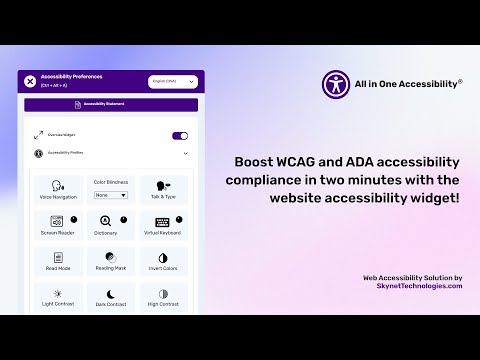
See how the app performs with improved accessibility features:
CORS Policy Configuration
To avoid CORS policy issues, ensure the following URLs are allowed on your website. Add them to your CORS configuration or trusted domains list.
| Domain | Description | Usage |
| --- | --- | --- |
| https://*.skynettechnologies.com | Skynet Technologies (Global Domain) | API access and resources |
| https://*.skynettechnologies.us | Skynet Technologies (US Domain) | API access and resources |
| https://*.googleapis.com | Google APIs | Services like Fonts, Translation |
| https://*.gstatic.com | Fonts APIs | Custom Fonts |
| https://vlibras.gov.br | VLibras – Brazilian Sign Language Service | Sign Language |
| https://ipapi.co | ipapi – IP Geolocation API | Called once during installation to detect an EU location and add the EU-based app script (endpoint: /json/) |
Instructions
- Update your server's CORS configuration to include these URLs.
- Ensure wildcard subdomains (*) are supported where necessary.
- Verify functionality by testing requests to these domains.
- If issues persist, consult the documentation for CORS configuration guidance.
FAQs
Is this extension compatible with multisite setups?
Yes. Each domain and subdomain needs its own license, or you can choose a multisite plan to manage several websites from one dashboard.
Are any features limited in the free trial?
No. The 10-day free trial includes all accessibility features.
Does it support multilingual websites?
Yes. It supports 190+ languages and automatically detects the visitor's browser language. If your site's default language is, for example, Spanish, the screen reader will read in Spanish.
Which languages do the screen reader, virtual keyboard, and other features support?
Screen Reader, Talk & Type, and Live Site Translation support 50+ languages; the Virtual Keyboard supports 40+ languages; Voice Navigation and Dictionary Search support 15+ languages. See language support details.
Can I change the screen reader voice?
Yes. You can choose from a range of voices by tone, accent, and speech style.
Does it handle image alt text?
Yes. AI automatically remediates image alt text, and you can add or edit alt text from the dashboard.
Can I change the accessibility statement?
Yes. Set a custom accessibility statement URL from the dashboard under app settings.
Does it include sign language?
Yes. It includes Brazilian Sign Language (Libras).
Will it slow down my website?
No. The app loads asynchronously and typically adds under 100 ms, with negligible impact on page speed.
Do staging or development sites need a separate license?
No. After purchase, contact [email protected] with your staging/UAT URL and it will be added free of charge.
Can I remove Skynet Technologies branding?
Yes, with the White Label add-on.
Can I customize the accessibility menu?
Yes. The Modify Accessibility Menu add-on lets you reorder, remove, and restructure menu items and languages.
Is there a discount for non-profits or multiple websites?
Yes. Discounts are available for 501(c)(3) non-profits and for multiple websites. See pricing or contact us for a custom plan.
Is on-premises deployment available?
Yes. Contact [email protected] for on-premises pricing and setup assistance.
Which themes are supported?
Cassiopeia, Protostar, and many more.
Documentation
- Joomla Accessibility App
- How to install the accessibility app on Joomla
- Accessibility App Features Guide
- Free Widget vs Paid App Comparison
Support
Submit a Support Request
Visit our support page and fill out the form. Our team will get back to you as soon as possible.
Send Us an Email
Email our support team: [email protected]
Accessibility Paid Add-on Services
- Evaluate your website's accessibility with a web accessibility consultant.
- WCAG 2.0 / 2.1 / 2.2 Level AA conformance testing
- Automated, semi-automated, and manual testing
- Simple before-after UI/UX recommendations on how to fix the issues
- Comprehensive audit report
Manual Accessibility Remediation
Our experts manually fix accessibility issues across your website to meet WCAG standards, improve the experience for people with disabilities, and provide a detailed report of the improvements made.
VPAT Report / Accessibility Conformance Report (ACR)
The Voluntary Product Accessibility Template (VPAT), also known as an Accessibility Conformance Report (ACR), starts with an audit and documents the current accessibility of a website, application, or other digital asset.
Make video content accessible with captions, transcripts, and related remediation.
Accessibility Paid Add-ons
A faster, cost-effective way to extend accessibility across your website and documents.
Automatically scan and monitor your website for WCAG and ADA issues, and track compliance progress quickly.
AI-powered PDF accessibility remediation - upload PDFs, scan website PDFs, and download remediated files.
MS Office File Accessibility Checker
Microsoft Office files (Word, Excel, PowerPoint) accessible quickly and cost-effectively.
Let visitors search your website using their voice.
Remove the Skynet Technologies logo and all footer links, popups, the "report a problem" link, and more for full white-label control.
Instant Live Site Translations
Translate your website into over 190 languages instantly to enhance accessibility for non-native speakers, individuals with language acquisition difficulties, and those with learning disabilities. Plans are based on the number of pages.
Reorder, remove, and restructure menu buttons and languages to fit users' specific accessibility needs.
Partnership Opportunities
Agency Accessibility Partnership
Offer ADA, EAA, and WCAG accessibility solutions to your clients. Partners get free accessibility integration for their own website, free white-label branding, commissions, and a dedicated partner relationship manager.
Platform Integration Partnership
For CMS, CRM, LMS, ecommerce platforms, and website builders that want to offer the accessibility app as a built-in feature and add a new revenue stream.
Earn a commission every time a customer subscribes through your referral link. We handle billing, onboarding, and support.
For more details, explore accessibility partnership opportunities.
Enterprise & Custom Plans
Looking for an enterprise accessibility solution, on-premises deployment, or a custom plan? Reach out to [email protected].
Credits
This extension is developed and maintained by website accessibility company – Skynet Technologies USA LLC.
Current Maintainers
All in One Accessibility Pro
- Version:
- 1.5.0
- Developer:
- Skynet Technologies USA LLC.
- Last updated:
-
Oct 27 2026
1 week ago - Date added:
- Dec 15 2022
- License:
- GPLv2 or later
- Type:
- Paid download
- Includes:
- m
- Compatibility:
- J3 J4 J5 J6
Share